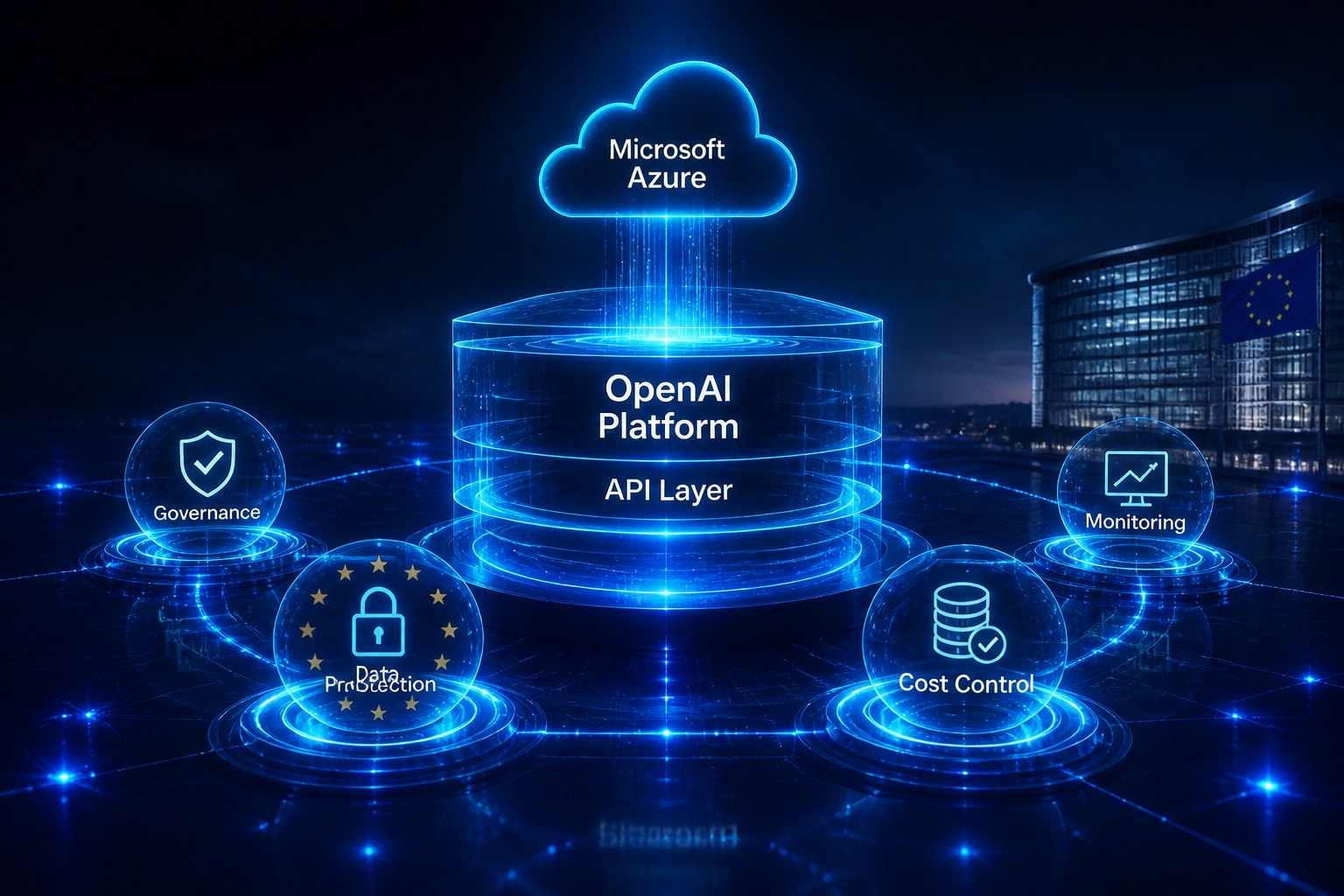
The OpenAI Platform is the developer environment where organisations access OpenAI models through an API, manage projects, keys and billing, and build their own AI applications, separate from the ChatGPT product employees use in a browser. For enterprise teams in regulated sectors, it is the layer where model choice, data handling, cost and governance decisions are actually made.
This guide explains what the platform contains, how it differs from ChatGPT, how pricing and limits work, and how to run it responsibly in a Swiss or European organisation that already relies on Microsoft technology.
What is the OpenAI Platform?
The OpenAI Platform is OpenAI's programmable interface to its models, delivered through an API, software development kits and a web dashboard for administration. Where ChatGPT is a finished application, the platform gives your engineers building blocks: text generation, embeddings, image and audio capabilities, tool calling and fine-tuning options.
Its main components are:
- API access: endpoints that send prompts to a model and return responses.
- Dashboard: a console for creating organisations, projects, API keys and usage views.
- Documentation and SDKs: reference material and client libraries for common programming languages.
- Playground and evaluation tools: a place to test prompts and compare model behaviour before code is written.
- Batch and asynchronous processing: a route for high-volume work that does not need an immediate answer.
For an IT leader, the practical point is that the platform is infrastructure. It sits behind internal assistants, document processing pipelines, search tools and agents, and it needs the same operational discipline as any other production service.
How does the OpenAI Platform differ from ChatGPT?
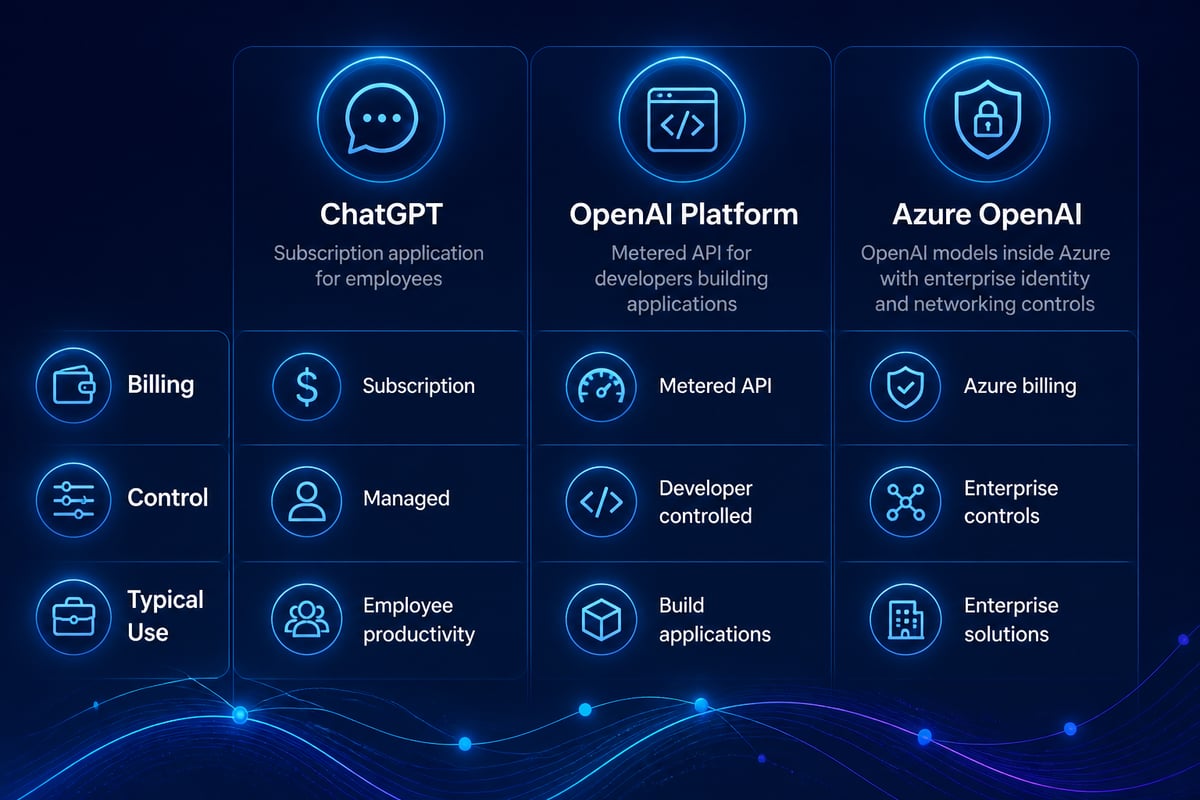
The two products serve different purposes and are billed separately. ChatGPT is a subscription application for individual and team use, whereas the platform is a metered service your developers call from code. OpenAI's API pricing page states that API usage is billed separately from ChatGPT Plus, Business, Enterprise and Edu subscriptions, so a ChatGPT licence does not include API credit.
This distinction matters for budgeting and for data governance. Employees using ChatGPT are governed by one set of terms and admin controls, while applications built on the API are governed by the project, key and retention settings you configure. Many organisations discover they need both: ChatGPT for individual productivity, and API-based applications for processes that must be integrated, logged and audited.
If your organisation is standardising on Microsoft tooling, a third route exists. Azure OpenAI delivers OpenAI models inside the Azure environment, with Azure's identity, networking and compliance controls around them. Stellium Consulting covers the practical trade-offs in its overview of Microsoft Azure OpenAI.
How is the OpenAI Platform structured: organisations, projects and keys?
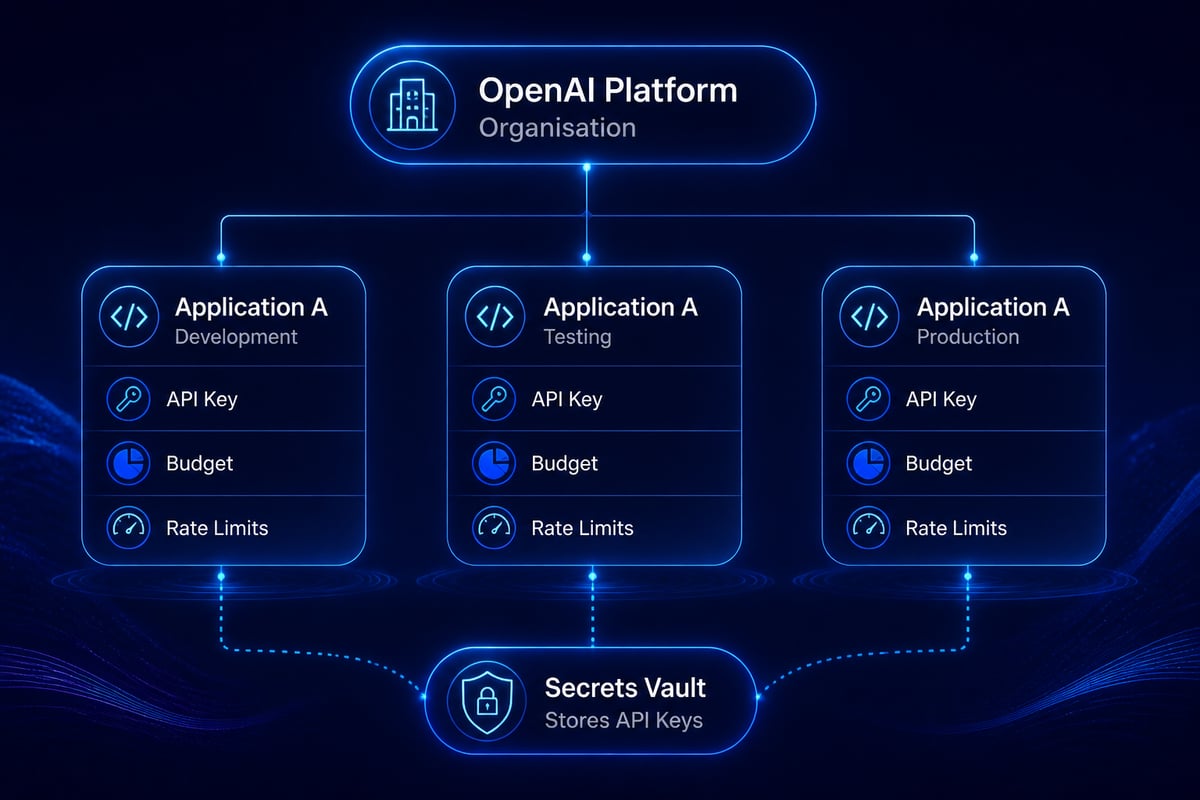
Access on the platform is organised in layers: an organisation at the top, projects beneath it, and API keys scoped to projects. This hierarchy is the foundation of cost allocation and access control, so it deserves design effort before the first prototype goes live.
A workable structure for a mid-to-large enterprise typically looks like this:
- One organisation owned by a central platform or AI team, with a small number of named administrators.
- One project per application or business unit, such as a claims triage assistant or a regulatory document summariser.
- Separate projects for development, testing and production, so that experimental traffic never shares a key or budget with live workloads.
- Keys issued to services, not individuals, stored in a secrets vault and rotated on a schedule.
Rate limits follow the same structure. OpenAI's rate-limit documentation explains that limits are set at the organisation and project levels, vary by model, and can include requests per minute and tokens per minute. Splitting workloads into projects therefore also helps you isolate a noisy experiment from a production service.
Which models and capabilities does the platform offer?
The platform offers a family of models covering text, reasoning, embeddings and multimodal inputs, and the exact lineup changes frequently. Treat any fixed list as provisional and check the current model documentation before committing an architecture.
Three concepts underpin every model decision:
- Tokens: the unit of text that models read and write, and the basis for both pricing and limits. A longer prompt or response costs more and takes longer.
- Context window: the amount of text a model can consider in a single request. Large document workloads depend on it.
- Embeddings: numerical representations of text used for semantic search and retrieval, which let an assistant ground its answers in your own documents.
Larger, more capable models usually cost more per token and respond more slowly. A common pattern is to route simple classification or extraction tasks to a smaller model and reserve the most capable model for reasoning-heavy steps. For a view of how newer releases change that calculation, see Stellium Consulting's analysis of GPT-5.5 and what it means for your business.
How does pricing work and how can you control cost?
The platform is billed by usage, mainly by the number of input and output tokens processed, with rates varying by model and tool. Current rates are published on OpenAI's API pricing documentation, which also lists the options available for batch processing.
Cost control starts with architecture rather than invoices. Four levers matter most:
- Model selection: use the smallest model that meets the quality bar for each task.
- Prompt discipline: shorter, structured prompts and capped output lengths reduce token spend.
- Caching and reuse: avoid sending identical context repeatedly where the design allows it.
- Batch processing: move non-urgent work to asynchronous jobs.
The last lever is often the most valuable for data-heavy teams. OpenAI's Batch API FAQ states that Batch API pricing is lower than synchronous API pricing, so batch processing can reduce cost for non-urgent work. Overnight document classification, large-scale summarisation and back-catalogue enrichment are natural candidates, because nobody is waiting on an immediate answer.
What are rate limits and how should you plan for them?
Rate limits cap how many requests and tokens a project can send in a given period, and they exist to protect service stability. Hitting them in production produces errors and degraded user experience, so they belong in capacity planning from the start.
Plan for them in four steps:
- Estimate peak requests per minute and tokens per minute for each application, not just daily averages.
- Compare those figures with the limits shown for your chosen model in the dashboard.
- Add retry logic with exponential back-off, and queue non-urgent work rather than sending it in bursts.
- Monitor usage against limits and raise a request for higher limits before a launch, not after it.
Because limits sit at organisation and project level, one runaway workload can starve another if they share a project. This is a further argument for the project-per-application structure described earlier.
How should regulated organisations handle data protection and retention?
Regulated organisations should treat the platform as a data processor and map every data flow before go-live. That means knowing what leaves your environment, how long it is retained, and which controls apply to each type of request.
Retention deserves particular attention because different features behave differently. OpenAI states in its Batch API FAQ that zero data retention does not apply to the Batch API, and that batch files and related artefacts follow the configured Batch, File Service and Sediment retention policies. A team that assumed zero retention across all endpoints could therefore be wrong for its batch workloads, which matters for pharma, insurance and public-sector data.
A practical data-protection checklist for Swiss and European teams:
- Classify the data each application will send and exclude categories that must not leave your boundary.
- Minimise and pseudonymise personal data before it reaches a prompt.
- Confirm retention settings per endpoint and document them in your records of processing.
- Check data residency requirements against how and where the service is delivered.
- Involve your data protection officer before a pilot moves to production.
For many Swiss institutions, running OpenAI models inside Azure, with private networking and existing compliance tooling, is the more comfortable route. Stellium Consulting's Cloud and AI Platforms service covers secure, scalable AI infrastructure on Microsoft Azure, from compliant landing zones to advanced AI deployments, which is the foundation many regulated clients need before scaling beyond a pilot.
How do you govern AI built on the OpenAI Platform?
Governance means defining who may build what, how outputs are validated, and how risks are tracked over time. Without it, API access tends to spread through the organisation as unmanaged shadow projects.
The NIST AI Risk Management Framework is a useful, voluntary reference, and its generative AI companion is directly relevant. NIST published its Generative AI Profile as a cross-sector companion to the framework. Mapping your own controls against that catalogue gives auditors and risk committees a recognised structure.
Core governance practices include:
- Human-in-the-loop validation for outputs that affect customers, patients, claims or regulatory filings.
- Bias and quality checks run on a representative test set before release and after each model change.
- Logging and traceability of prompts, responses and model versions used.
- Change control for model upgrades, since a new version can alter behaviour.
- Clear ownership of each application and its risk assessment.
Stellium Consulting builds responsible AI into every solution, including human-in-the-loop validation, privacy safeguards and bias checks. Its article on an AI governance platform sets out how those controls can be organised across a portfolio rather than application by application.
How do you move from pilot to production?
Moving from pilot to production means turning a working prototype into a monitored, supportable service with defined owners and limits. Most stalled pilots fail on operations and ownership rather than on model quality.
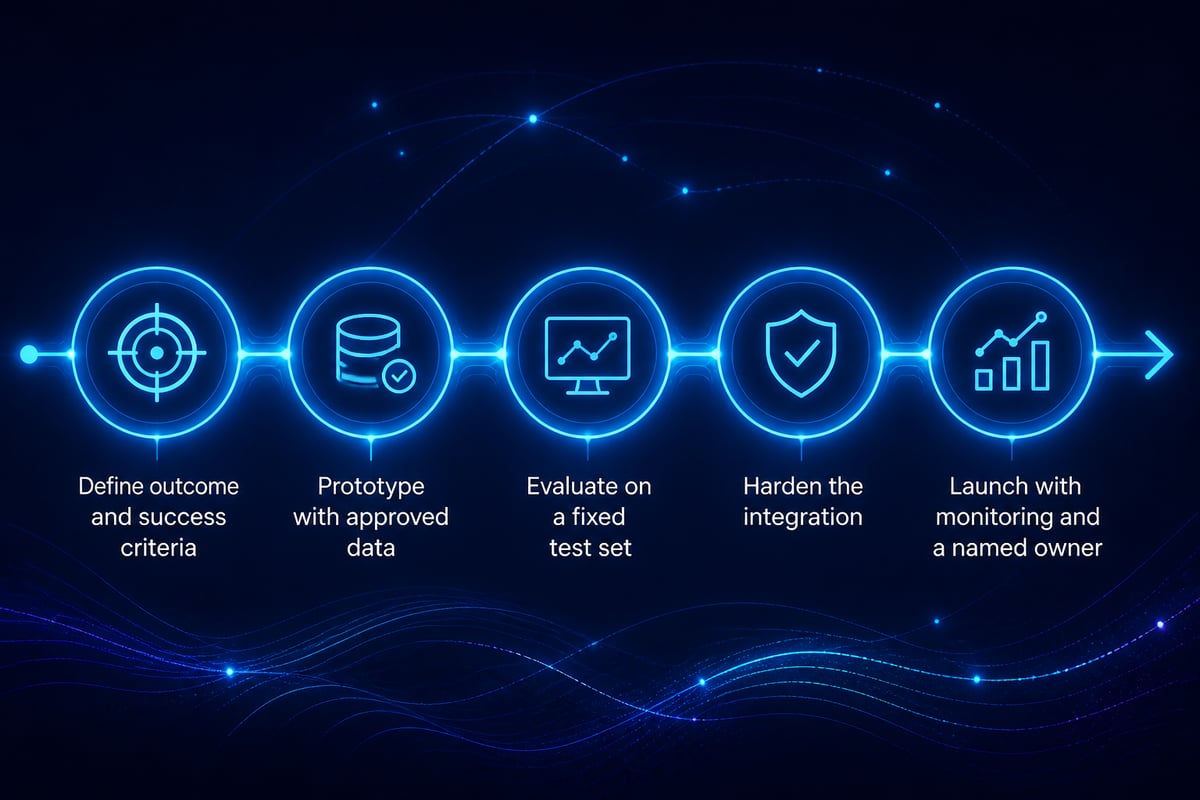
A sensible path has five stages:
- Define the business outcome and a measurable success criterion, such as handling time, accuracy against a reviewed sample or deflection of routine queries.
- Prototype in the playground and a development project, using synthetic or approved data.
- Evaluate systematically, with a fixed test set, scoring criteria and reviewers from the business.
- Harden the integration: secrets management, retries, rate-limit handling, logging and fallback behaviour when the service is unavailable.
- Launch with monitoring of cost, latency, error rates and output quality, plus a named owner and a review cadence.
Integration with the rest of your Microsoft estate usually decides whether adoption sticks. Connecting outputs to Teams, SharePoint or Power Platform workflows keeps AI inside the tools people already use, a theme explored in Stellium Consulting's guide to enterprise AI adoption.
Should you use the OpenAI Platform directly or through Azure?
The answer depends on your compliance posture, existing contracts and the control you need over networking and identity. Direct use offers the fastest access to new features, while Azure delivery aligns more naturally with enterprise security and procurement.
| Consideration | Direct OpenAI Platform | Azure OpenAI |
|---|---|---|
| Billing and contracts | Separate OpenAI account and billing | Within your Microsoft agreement |
| Identity and access | OpenAI organisation, projects and keys | Microsoft Entra ID and Azure role-based access |
| Networking | Public endpoints | Private networking options in Azure |
| Governance tooling | Configured by your team | Integrated with Azure policy and monitoring |
| Feature timing | Often earliest availability | Availability can follow later |
Neither route is universally better. Many organisations prototype quickly on the direct platform with non-sensitive data and then deploy regulated workloads through Azure. Whichever route you choose, record the decision, the data classes allowed on each, and the review date, so the architecture can be defended in an audit.
What are the common mistakes to avoid?
The most common mistakes are organisational rather than technical, and each can be prevented with a short decision made early.
- Sharing one API key across teams, which removes cost attribution and makes incident response slow.
- Assuming a ChatGPT subscription covers API use, when the two are billed separately.
- Ignoring retention differences between endpoints, particularly for batch jobs.
- Skipping evaluation sets, so quality regressions after a model update go unnoticed.
- Sending raw personal data in prompts when pseudonymised input would do.
- Launching without rate-limit planning, leading to errors at the first real traffic peak.
- Treating the pilot team as the long-term owner, with no operational handover.
Avoiding these does not require a large programme. A one-page standard covering project structure, key handling, data classes, evaluation and ownership is enough to keep the first five applications consistent, and it gives every later project a template to follow.
Frequently asked questions
Is the OpenAI Platform the same as the OpenAI API?
They are closely related but not identical. The API is the programmatic interface, while the platform also includes the dashboard, documentation, playground, billing and project administration around it.
Does our company data train OpenAI models?
Data handling depends on the product and the terms you have accepted, so confirm the current position in OpenAI's documentation and your contract rather than relying on assumptions. Record the answer in your data protection assessment.
Can we use the platform for regulated data?
It can be, provided you classify the data, apply minimisation, verify retention settings and satisfy your regulator's expectations. Many regulated organisations prefer Azure delivery for the added network and identity controls.
Who should own the platform inside the organisation?
A central platform or AI team should own the organisation account, key policy and standards, while individual business teams own their applications and the risk decisions within them.
How much will it cost us?
Cost depends on model choice, volume and prompt design, so estimate from a pilot with real traffic. Use batch processing for non-urgent work and monitor spend per project from the first week.
Your next step is to list the three AI use cases closest to production and, for each, write down the data classes involved, the model route (direct or Azure) and a named owner. If you would like an experienced partner to pressure-test that plan, Stellium Consulting is a Microsoft Solutions Partner and Microsoft Partner of the Year in Switzerland, delivering AI solutions built natively on the Microsoft ecosystem and designed around each client's business goals rather than a template. Its Cloud and AI Platforms service is a natural starting point for secure Azure foundations, and you can let’s talk about your AI roadmap with Stellium Consulting whenever you are ready to turn that list into a delivery plan.