
Claude AI is an AI assistant built by Anthropic, and for business it is worth serious consideration where long documents, careful writing and structured reasoning matter more than tight integration with a single productivity suite. It is a strong fit for analysis-heavy teams, but regulated organisations in Switzerland and Europe should weigh it against their existing Microsoft estate before committing. This review covers what the product is, what it costs, where it performs well, where it falls short and who should choose it, based on published pricing, vendor documentation and reviewer reports rather than hands-on testing.
What Claude AI is and how businesses use it
Claude is a family of large language models and a chat assistant from Anthropic, available through a web and mobile app, an API and several cloud marketplaces. Businesses use it for drafting and editing, summarising long documents, analysing data, writing and reviewing code, and building internal assistants through the API.
The assistant comes in several model tiers, typically balanced between speed, cost and reasoning depth. Smaller models suit high-volume tasks such as classification or triage. Larger models suit contract review, policy analysis and complex research questions. Anthropic also makes Claude available through major cloud platforms, which matters to organisations that prefer to buy AI capacity through an existing cloud agreement.
Reviewers often highlight three traits: a large context window for working with lengthy files, a measured and readable writing style, and a cautious approach to sensitive requests. That last point cuts both ways, as discussed below.
Key features that matter to an enterprise buyer
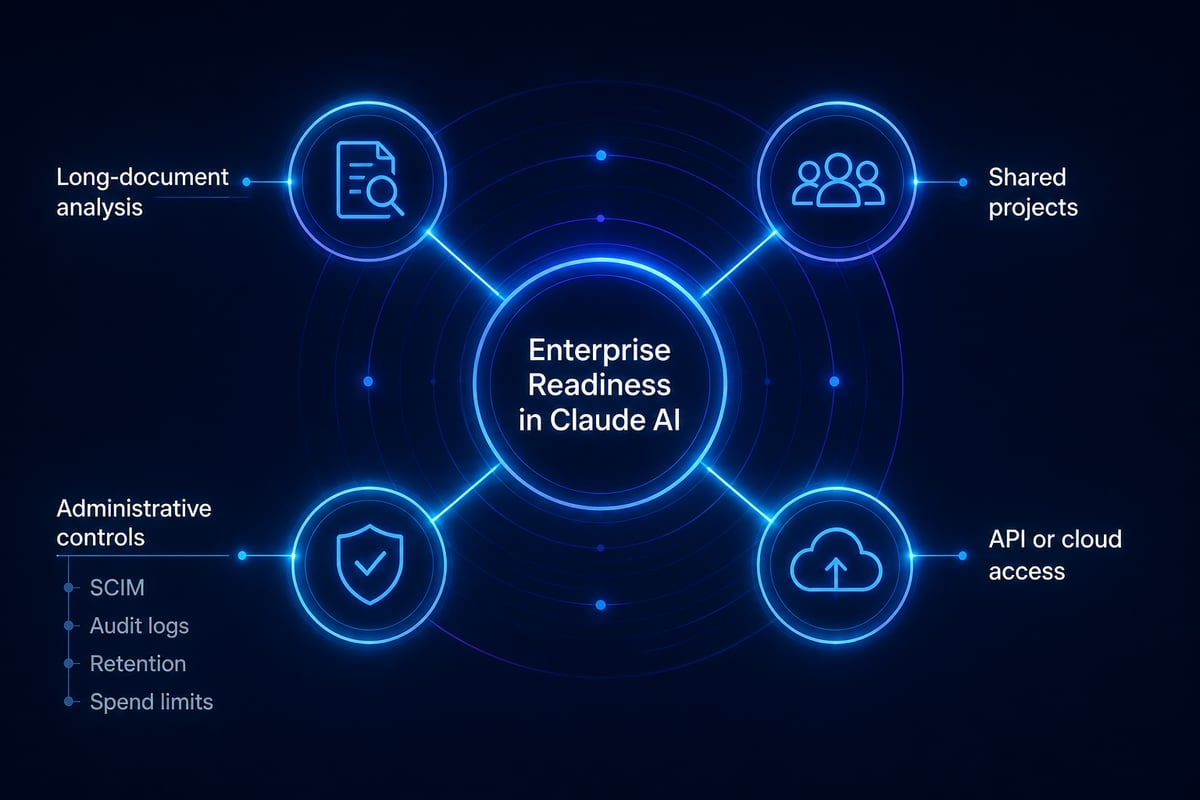
The features that matter most to a business buyer are document handling, team collaboration, administrative control and developer access. Consumer-facing extras matter far less than these four.
- Long-document analysis: Claude can ingest large reports, contracts and datasets in a single conversation, which suits due-diligence, regulatory and research workflows.
- Projects and shared context: Teams can keep reference material and instructions together so that outputs stay consistent across colleagues.
- Coding support: Developers use Claude for generation, refactoring and review, and the API allows it to be embedded in internal tools.
- Administrative controls: Higher plans add role-based permissions, SCIM, audit logs, custom data retention and organisation spend limits, according to the Claude pricing page.
- API and cloud access: The models can be called directly or consumed through large cloud platforms, so existing procurement and security reviews may be reusable.
For IT leaders, the administrative layer is the deciding factor. SCIM provisioning and audit logs are the baseline for any tool that will touch internal documents.
Claude AI pricing for teams and enterprises
Claude AI pricing is seat-based for business plans, with usage-based charges added at the enterprise tier. All figures below are approximate and correct as of November 2026; confirm them with the vendor before budgeting, since prices change and are quoted in US dollars.
| Plan | Approximate price | Notes |
|---|---|---|
| Pro (individual) | $20 per month | Listed in the US with local-currency pricing where supported and an annual option, per the Claude Help Center |
| Team, Standard seat | $20 per seat per month billed annually, or $25 monthly | For teams of 2 to 150 |
| Team, Premium seat | $100 per seat per month billed annually, or $125 monthly | Higher usage allowance |
| Enterprise | $20 per seat per month billed annually | 20-seat minimum; usage billed separately at API rates |
The Team plan also includes pooled API credits of up to $500 per month, according to the pricing page. The Enterprise structure deserves attention from finance teams. The seat fee is low, but usage is billed separately at API rates, as the official Enterprise plan overview explains. A department that uses the assistant heavily can therefore cost far more than the headline seat price suggests, so budgets should be modelled on expected usage rather than on seat counts alone.
For a UK-focused comparison of tiers and model costs, Wise publishes a guide to Claude pricing, though most listed prices are in US dollars. Swiss and EU buyers should account for currency conversion and applicable taxes.
Strengths reviewers report
The strengths most often cited are writing quality, handling of long inputs and dependable reasoning on structured tasks, as seen in published reviews and owner feedback.
Writing and editing. Output tends to read as measured and natural, with fewer of the stock phrases that mark machine-written text. Communications, legal and policy teams often find less rewriting is needed.
Long-context work. Summarising a hundred-page report or comparing several versions of a document is a common use. For pharma, insurance and finance teams that work with dense, text-heavy material, this is the clearest practical advantage.
Coding. Developers often find Claude useful for code generation and review, and the API makes it straightforward to build bespoke assistants.
Cautious behaviour. Anthropic positions safety as a design priority. For organisations that must demonstrate responsible use, a model that is conservative by default is a point in its favour.
Limitations and risks to weigh
The main limitations are narrower ecosystem integration, usage caps, a conservative refusal style and governance questions that every regulated organisation must answer for any external AI tool.
- Integration depth. Claude does not sit natively inside Outlook, Teams, SharePoint or Excel the way Microsoft 365 Copilot does. Connecting it to Microsoft data requires additional configuration or development.
- Usage limits. Heavy users on lower tiers may hit message limits, which can push teams toward Premium seats or API billing.
- Over-caution. The same conservatism that reassures compliance teams can occasionally produce refusals or hedged answers on legitimate requests.
- Variable cost at scale. Enterprise usage billed at API rates can be difficult to forecast without monitoring.
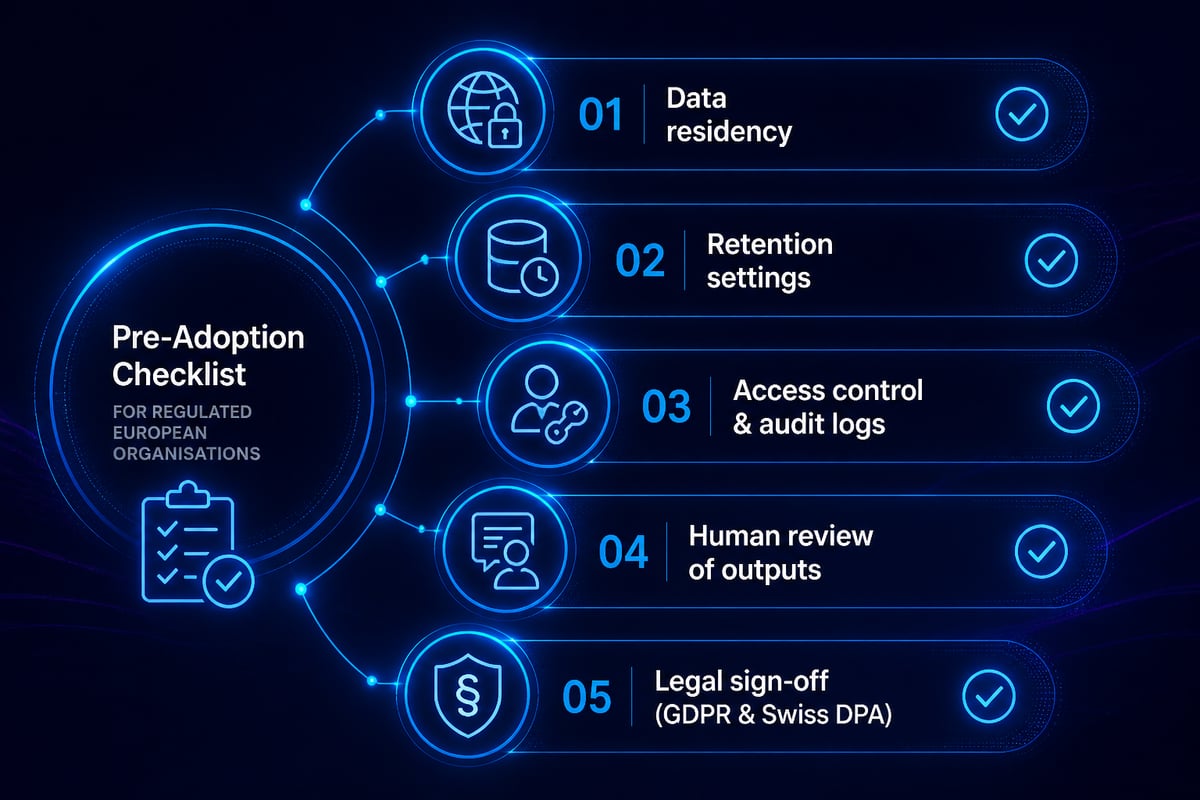
- Governance. Data residency, processing location, retention and contractual terms need legal review against the Swiss Federal Act on Data Protection and the GDPR, regardless of vendor.
None of these rules Claude out. They define the conditions under which it works well.
How Claude AI compares with the main alternatives
Claude's closest rivals for business use are Microsoft 365 Copilot, ChatGPT, Google Gemini and Perplexity, and the right choice depends on where your teams already work.
Microsoft 365 Copilot
Microsoft 365 Copilot is designed for work inside Microsoft 365 and integrates with the productivity workflows already used across Word, Excel, Outlook and Teams. It is best for organisations that rely on Microsoft 365. For the audience of this article, it is usually the default starting point, because identity, permissions and compliance controls are already in place.
ChatGPT
ChatGPT, from OpenAI, is a general-purpose assistant for writing, analysis, files and coding. Its Business plan suits mixed team workflows. It is best for businesses seeking a versatile, all-purpose assistant, and it competes with Claude most directly on general capability.
Google Gemini
Google Gemini works with Google apps and Workspace workflows. AI Pro is a paid individual plan, while business Workspace pricing and entitlements differ. It is best for teams centred on Google Workspace, so it is a weaker fit for Microsoft-first organisations.
Perplexity
Perplexity is a research-focused AI search tool that returns cited sources, and its Pro plan adds paid features. It is best for market research teams that need source-backed answers, and it complements rather than replaces a drafting assistant.
Side-by-side summary
| Tool | Best suited to | Main strength |
|---|---|---|
| Claude AI | Document-heavy analysis and writing | Long-context reasoning |
| Microsoft 365 Copilot | Microsoft 365 organisations | Native suite integration |
| ChatGPT | Mixed, general team workflows | Versatility |
| Google Gemini | Google Workspace teams | Workspace integration |
| Perplexity | Research and market intelligence | Cited sources |
Using Claude AI alongside a Microsoft estate
For Microsoft-first organisations, the practical question is rarely Claude or Copilot, but where each belongs. A sensible pattern is to use Microsoft 365 Copilot for everyday work in Outlook, Teams and Office documents, where grounding in tenant data and existing permissions is the benefit. Claude can then serve specific workloads that favour deep reading and structured output, such as regulatory submissions, contract comparison or internal knowledge assistants built through the API.
This is also where governance does the most work. Each additional model adds a data flow to document, a vendor to assess and a set of retention rules to confirm. Human-in-the-loop validation, privacy safeguards and bias checks should be designed in from the start, not added after a pilot. Stellium Consulting, a Microsoft Solutions Partner that specialises in AI-powered solutions for enterprises, builds its solutions on the Microsoft ecosystem with responsible AI built into each one, and has worked with clients including JTI, a Swiss law firm and a public hospital in Switzerland. That experience is relevant when the question is how to introduce a second assistant without fragmenting security and compliance.
Skills matter as much as tooling. Teams that receive structured training on prompting, verification and acceptable use extract far more value than those left to experiment. Training providers and online courses can support that upskilling, and developers building on the API can find practical tutorials to get started.

Who should choose Claude AI, and who should skip it
Claude AI suits teams whose work is dominated by reading, writing and reasoning over long documents, and it is a weaker choice where deep suite integration or low-friction rollout is the priority.
A good fit if you:
- Analyse long reports, contracts or research in regulated sectors such as pharma, finance and insurance
- Need high-quality drafting for policy, legal or communications work
- Plan to build internal assistants through the API or a cloud marketplace
- Want a conservative, safety-oriented model and can complete the necessary governance review
Better to skip, or defer, if you:
- Need AI embedded directly in Outlook, Teams and Excel with minimal setup, where Microsoft 365 Copilot is the more direct route
- Cannot yet confirm data residency, retention and contractual terms with legal and compliance
- Lack a way to monitor and cap usage-based spend at the enterprise tier
- Are Google Workspace-centred, where Gemini fits more naturally
Verdict: is Claude AI worth it for business?
Claude AI is worth it for business when it is deployed for a defined set of document-heavy, reasoning-heavy workloads and governed as carefully as any other external AI service. Its writing quality, long-context handling and administrative controls are real strengths, and Team and Enterprise pricing is competitive on a per-seat basis. Its weaknesses are the absence of native Microsoft 365 integration, usage-based enterprise costs that can rise quickly and the governance work that any regulated organisation must complete.
For most Microsoft-centred enterprises in Switzerland and Europe, the most defensible approach is staged: keep Microsoft 365 Copilot as the everyday assistant, pilot Claude on two or three high-value use cases, measure time saved and error rates, and expand only once data protection and cost controls are proven. Separate tools for tracking visibility and content performance can help marketing teams measure the downstream effect of AI-assisted content, though they are distinct from the assistant decision itself.
Your next step is to select one high-value document workflow, such as contract comparison or regulatory summarisation, and run a time-boxed pilot with a clear measure of success and a documented data protection review. If you would like help choosing between Claude and the Microsoft AI tools you already own, or designing a pilot with human-in-the-loop validation built in, Let’s Talk with the Stellium Consulting team about a plan that fits your business goals and compliance obligations.